> For the complete documentation index, see [llms.txt](https://docs.does.qa/llms.txt). Markdown versions of documentation pages are available by appending `.md` to page URLs; this page is available as [Markdown](https://docs.does.qa/guides/test-tabs-windows-and-frames.md).
# Test tabs, windows, and frames
Move between tabs, windows, and iframes while a Flow runs.
Some journeys open a new tab, a popup window, or content inside an iframe. DoesQA keeps focus on one place at a time, so you add a step when the Flow should move.
```mermaid
flowchart TD
touch["Touch opens popup or tab"] --> window["Switch window or Next tab"]
window --> work["Set value Touch Check"]
work --> frame["Switch frame when content is in an iframe"]
frame --> parent["Switch to parent frame"]
```
Use the **Flow Builder** for this walkthrough.
## Switch to a popup window
{% stepper %}
{% step %}
## Open the popup
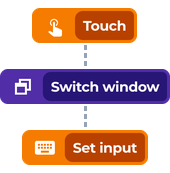
Use [**Touch**](/test-steps/action/touch.md) (or another step) on the control that opens the new window.
{% endstep %}
{% step %}
## Switch window
Add [**Switch window**](/test-steps/runner/switch-window.md) from the [**Runner**](/test-steps/runner.md) family.
Enter part of the window **Domain / Title**. DoesQA matches that text against the page title, then the URL.
{% endstep %}
{% step %}
## Continue in the new window
Add [**Set value**](/test-steps/action/set-value.md), [**Touch**](/test-steps/action/touch.md), or Checks as usual.
{% endstep %}
{% step %}
## Return if you need the original window
Add another [**Switch window**](/test-steps/runner/switch-window.md) with Domain / Title text from the first window.
{% endstep %}
{% endstepper %}
Example popup window path
## Move between tabs
| Test Step | What it does |
| ------------------------------------------------------------- | ------------------------- |
| [Next tab](/test-steps/browser/next-tab.md) | Moves to the next tab |
| [Previous tab](/test-steps/browser/previous-tab.md) | Moves to the previous tab |
| [Close current tab](/test-steps/browser/close-current-tab.md) | Closes the tab you are on |
These steps are relative to the current tab. There is no tab index field.
## Work inside an iframe
{% stepper %}
{% step %}
## Switch into the frame
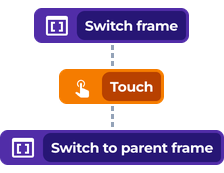
Add [**Switch frame**](/test-steps/runner/switch-frame.md).
Choose the [Element](/elements/creating-elements.md) that represents the iframe.
{% endstep %}
{% step %}
## Interact inside the frame
Add Action and Check steps against Elements inside that frame.
{% endstep %}
{% step %}
## Leave the frame
Add [**Switch to parent frame**](/test-steps/runner/switch-to-parent-frame.md) when later steps belong to the page around the iframe.
{% endstep %}
{% endstepper %}
Example iframe path
{% hint style="info" %}
**Pro tip:** Keep Domain / Title text short but distinctive, such as part of the host name or a unique page title word, so [**Switch window**](/test-steps/runner/switch-window.md) lands on the right target.
{% endhint %}
## Related
* [Switch window](/test-steps/runner/switch-window.md)
* [Switch frame](/test-steps/runner/switch-frame.md)
* [Switch to parent frame](/test-steps/runner/switch-to-parent-frame.md)
* [Next tab](/test-steps/browser/next-tab.md)
* [Previous tab](/test-steps/browser/previous-tab.md)
* [Close current tab](/test-steps/browser/close-current-tab.md)
* [Choose durable selectors](/better-coverage/choose-durable-selectors.md)